
Artificial Double Tracking With Delayson. Achieve Vintage Vocals with Delayson
The Beatles brought not only legendary music to the world. They also revolutionized the way music was produced and, thanks to the engineers they worked with, developed new techniques that were never used at the time. One of them was the Artificial Double Tracking, or ADT. Invented by EMI engineer Ken Townsend, this technique was created to avoid double-tracking vocals for John Lennon.
But why did they need it, and how does it work? Let’s start at the beginning.
Double tracking
Double tracking is a common technique in music production. It consists of recording the same part twice to thicken and enrich the performance. It can be used on vocals, guitars or whatever you want to emphasize in the record.
It sounds great, but it’s time-consuming, and it can become tedious and boring for many artists, like John Lennon.
The problem is that if you just make a copy of an audio track, it increases the volume, but it doesn’t have the same effect as recording it twice. The reason behind this is that it’s not the same performance. Recording the same part twice introduces minor differences in pitch, timing, and volume, which create the effect. And here is where Mr Townsend’s invention came to be.
ADT
Ken Townsend understood all these factors and knew how much John Lennon hated to record his parts twice. So he came up with a way to use the same take of John’s performance and turn it into a double track.
Using two tape machines and synchronizing them, Mr Townsend was able to play John’s part from the first tape and create a copy that sounded ever so slightly different thanks to the tape modulation from the second machine. Not only that, but to enhance the effect, he added an oscillator to the second tape machine, giving him manual control over its delay time. Flip the polarity of the signal from the delayed copy, and you get the classic ADT effect from John’s vocals.
The key part of the effect was not overpassing the 40 msec delay time on the second machine. This will make the effect sound like a delay instead of a double track.
Finally, by modulating the oscillator during performance, you could achieve interesting, artistic phasing when needed.
ADT with Delayson
Back in the day, this technique was a technical achievement due to the problems and challenges of analogue recording. Thankfully, nowadays it is very easy to recreate within our DAW with plugins like our newest addition to the Sonimus family: Delayson. And the best part, it’s free!
To create an ADT effect, create an auxiliary track in your DAW and add Delayson as your first insert. Then make a pre-fader send of the track you want to double to your ADT track. Now let’s set Delayson.
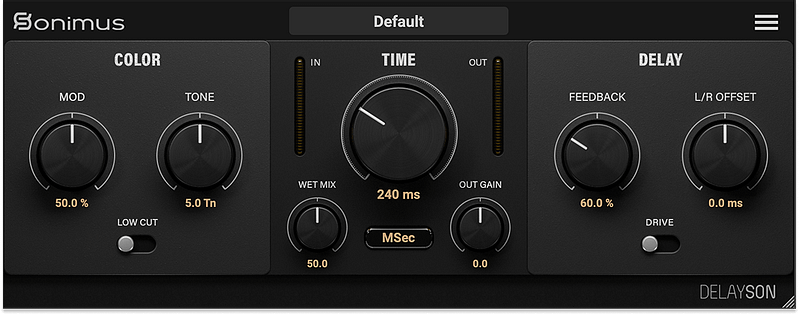
Start by setting the Wet Mix to 100% and using a delay time between 8 and 12 milliseconds. Bring the feedback all the way down and adjust the tone and low-cut switch to taste. By leaving the modulation at 50%, you will get a nice tape-style wow and flutter. Now play the track and adjust the delay time to something that fits your music. Just remember not to go further than 40 msec, or you will have a delay effect instead.
Finally, you can play around with the L/R Offset and drive switch to increase the saturation and widen the effect even further.
Even more modulation!
As we pointed out in a previous article, some DAWs, like Reaper, allow you to modulate parameters from your plugins. You can use this feature to control the delay time with an LFO or sync it to the project tempo to add even more variation to the ADT track.

Did you know about the ADT technique? Do you use it in your productions?
Let us know in the comments, and subscribe to our newsletter to know about more creative ways to use Sonimus plugins.






Leave A Comment
You must be logged in to post a comment.